App
Choose a safe way to access the Mahjong Ways app on mobile
Updated 26 October 2026 · Data: official PG Soft documents, public demo
Mahjong Ways app searches often lead to APK files that are not published by PG Soft. Mahjong Ways and Mahjong Ways 2 are HTML5 games, so they can run in a mobile browser or within a gaming platform app. This Bangladesh guide explains browser access, home-screen shortcuts, Android permission checks and the local legal context before you download anything.
01 · App
Mahjong Ways app: is there an official APK?
PG Soft has no official standalone Mahjong Ways APK. Mahjong Ways and Mahjong Ways 2 are HTML5 games, designed to run in a mobile browser or inside a gaming platform app. A search result calling an APK “official” does not establish that PG Soft made or verified the file.
The games support Android and iOS as well as HTML5, MacOS and Windows. Their listed optimal display is portrait at 1080x2340, with a 19.5:9 aspect ratio. A mobile browser can therefore be a practical way to access a game where it is made available. This guide does not provide an APK file.
| Search or access option | What it means |
|---|---|
| Mahjong Ways APK | No standalone APK from PG Soft was found. Treat APK claims cautiously. |
| Browser access | The games are HTML5 and can run in a mobile browser. Availability depends on the platform providing the game. |
| Platform app | A gaming platform may include the game inside its own app. This is not a PG Soft Mahjong Ways app. |
| Home-screen shortcut | A browser shortcut opens a website; it is not an APK or a separate game installation. |
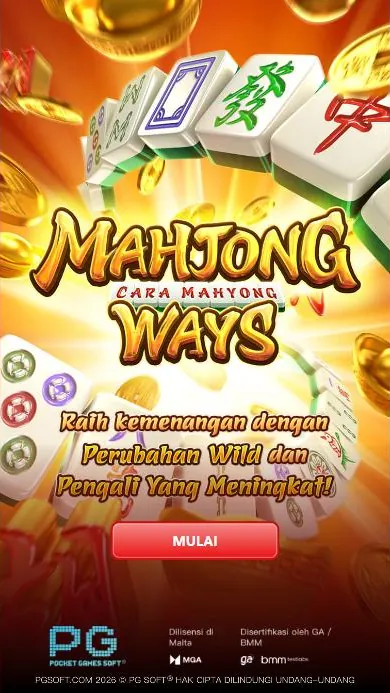
For a browser demonstration, see the Mahjong Ways demo. The public PG Soft demo has several interface languages; this section uses English. The games do not have their own account system. Login and registration, if offered, belong to the gaming platform, not to Mahjong Ways itself.
02 · App
Mahjong Ways download: use a browser shortcut
Adding a site shortcut can make a website easier to reopen, but it does not download the game as an independent app. Only do this for a site you have chosen and checked. Browser menus can change slightly between versions.
Android with Chrome
- Open Chrome and enter the address of the website you intend to use. Check the address carefully; a familiar game name does not prove a site is genuine.
- Open the browser menu and select Add to Home screen or the equivalent option shown on your device.
- Review the shortcut name and confirm. The icon opens the website in Chrome; it does not install a PG Soft APK.
- If the site asks you to install a separate file, stop and reassess rather than assuming that the request is required to play an HTML5 game.
iPhone with Safari
- Open the chosen website in Safari and verify its web address.
- Tap Share, then choose Add to Home Screen.
- Check the displayed name and confirm. The resulting icon is a shortcut to the website, not a standalone Mahjong Ways app.
These steps create a shortcut only. They do not validate a site, create a game account or change what the site offers. For game controls and the basic screen layout, see how to play Mahjong Ways.
03 · App
Mahjong Ways APK safety checklist for Android
Unofficial APK files can contain malware, fake modifications or purported hacks. They may also seek access to personal data or account details. A file name, logo, review count or claim of being a “mod” is not proof of safety. Avoid installing files from unverified download pages, and do not disable Android security protections to make an unknown file install.
Before granting any permission, use this checklist:
| Check | Safer approach |
|---|---|
| Source | Prefer a browser route or an app source you can independently verify. Do not assume a third-party APK is from PG Soft. |
| Requested permissions | Ask whether each permission is necessary for the stated purpose. A game shortcut should not need broad access to contacts, messages or files. |
| Account details | Do not enter credentials or personal information into an unfamiliar page or app. Avoid reusing passwords. |
| Security warnings | Do not dismiss warnings just to complete an installation. Remove a suspicious file rather than opening it. |
| Updates | Do not accept an unknown file as a game update. Check the source and purpose before installing anything. |
A browser game may still be hosted by a third-party platform, so browser access alone does not guarantee that the site is trustworthy or appropriate. Check the site address, privacy information and permissions, and leave if the page uses misleading download prompts. The login and registration guide explains the distinction between a platform account and the game itself.
04 · App
Mahjong Ways and Mahjong Ways 2 on mobile
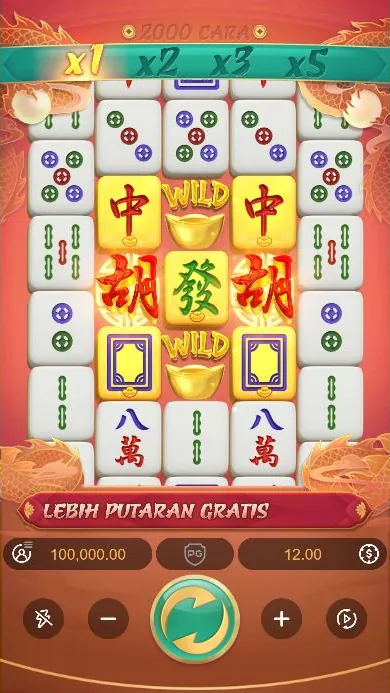
Both games are PG Soft mahjong-themed slots. Mahjong Ways was announced in December 2019 as PG Soft’s first mahjong-themed slot; Mahjong Ways 2 was announced as its sequel in April 2020. Their layouts differ, but both are intended to display in portrait orientation on mobile devices.
| Game | Layout and ways | Mobile-relevant feature |
|---|---|---|
| Mahjong Ways | 5 reels, 4 rows and 1,024 ways | Cascading wins and Gold Plated symbols on reels 2, 3 and/or 4. |
| Mahjong Ways 2 | 5 reels, with an extra row on reels 2, 3 and 4, and 2,000 ways | Cascades and Gold Plated symbols on reels 2, 3 and 4; during free spins, qualifying symbols on reel 3 appear in gold. |
In both games, winning symbols disappear and new symbols fall into place, with another win check. The multiplier above the reels starts at x1 and can rise through x2 and x3 to x5 during the base game. Free-spin multipliers are x2, x4, x6 and x10. These are game rules, not a prediction of a result. A separate Mahjong Ways 2 review covers its differences in more detail.
The public demo shows 1,024 ways for Mahjong Ways and 2,000 ways for Mahjong Ways 2. The games’ official materials describe a Wild symbol and Scatter features; they do not describe a Feature Buy. There is no official PG Soft Mahjong Ways 3 in the catalogue information covered here. “Mahjong Ways 3”, “black scatter” and hack or predictor claims found elsewhere should not be treated as official game features. See Mahjong Ways 3, Super Scatter and myths for those search terms.
05 · App
Performance tips for a mobile browser
A browser game can be affected by the device, browser, connection and other open apps. These general checks may help with loading or display problems, but they do not change the game’s outcomes.
- Keep the browser and operating system updated through their normal update settings.
- Close unused tabs and apps if the device is slow or the browser reloads the page.
- Use a stable connection and wait for the game to finish loading before interacting with it.
- Hold the phone in portrait orientation, which matches the listed 19.5:9 optimal display.
- If the page appears cut off, refresh it or check browser zoom and display settings rather than installing an unknown file.
- If audio or animation is distracting or the device is under strain, use the game’s sound or turbo controls where available, or close the game.
Controls described in the official PDFs include Spin, bet controls, wallet balance, win amount and game history, plus Auto Spin, Turbo Spin, sound, paytable and rules. Control availability can depend on the version and platform interface. Auto Spin is not a way to predict or control results. Each spin is independent; purported patterns, tricks and predictors do not make future outcomes certain.
06 · App
Bangladesh legal and age information
This page is an independent guide, not a statement that gambling is legal or that any particular platform is authorised. Section 20 of Bangladesh’s Cyber Security Ordinance, 2025 makes it an offence to create or operate a portal, app or device for gambling in cyberspace, take part in such gambling, assist or encourage it, or advertise or promote it. The stated punishment is imprisonment of up to two years, a fine, or both. Sections 21 and 22 prohibit gambling-related financial transactions and fraud. The CID of Bangladesh Police has also run a nationwide campaign against online gambling and identified mobile financial service agents used for gambling payments. Read the Bangladesh legal status guide for this site’s summary.
Real-money play is offered by third-party gaming platforms, not by the game’s own account system. Do not assume that a platform or its app is lawful, safe or officially connected to PG Soft. This guide is for adults aged 18 and over. For support, Kaan Pete Roi can be reached at +880 9612-119911 every day from 3 PM to 3 AM; call 999 for an emergency. See responsible gaming information for additional support guidance.
FAQ
Questions about Mahjong Ways
Is there an official Mahjong Ways APK download?
No official standalone Mahjong Ways APK from PG Soft was found. The games are HTML5 and can run in a mobile browser or inside a gaming platform app.
How can I get the Mahjong Ways app on Android?
There is no standalone PG Soft Mahjong Ways app identified here. You can open the game in a browser where it is available and add the website to your home screen; that creates a shortcut, not an APK.
Can I download Mahjong Ways on iPhone?
The HTML5 game can run in a mobile browser where a platform provides it. In Safari, Add to Home Screen creates a website shortcut rather than installing a separate Mahjong Ways app.
Are unofficial Mahjong Ways APK files safe?
An unofficial APK may contain malware, fake modifications or data-stealing features, and its name or logo does not verify its source. Avoid unknown files and do not grant permissions that are not clearly necessary.
Does Mahjong Ways have its own login or account?
No. The games do not have their own account system; any login or registration is handled by the gaming platform. In Bangladesh, check the legal context before accessing gambling-related services.