App
Find browser options for Mahjong Ways app access in India
Updated 26 October 2026 · Data: official PG Soft documents, public demo
Mahjong Ways app searches often lead to APK files, but PG Soft has no official standalone Mahjong Ways APK. The games are HTML5 titles that can run in a mobile browser or within a gaming platform app. This India guide explains how to access the public demo, add a browser shortcut, check Android permissions and understand the risks of unofficial downloads.
01 · App
Is there an official Mahjong Ways app or APK?
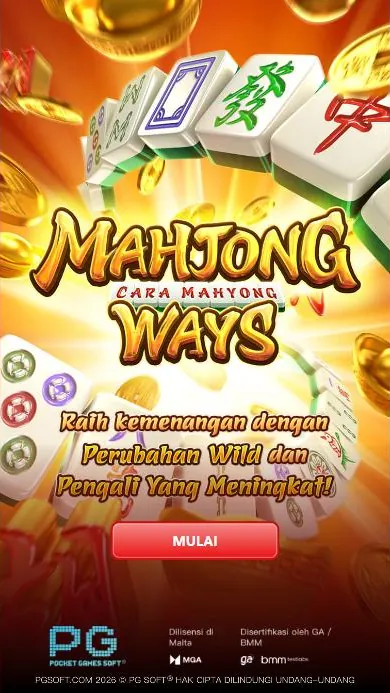
No standalone Mahjong Ways APK from PG Soft was found. Mahjong Ways and Mahjong Ways 2 are HTML5 games, so they can run in a compatible mobile browser or inside a gaming platform app. The games do not have their own account system: any login or registration is handled by the platform providing access. Read more about login and registration before entering account details on a third-party service.
The official PG Soft catalogue lists Mahjong Ways and Mahjong Ways 2. Its game information identifies iOS, Android, HTML5, MacOS and Windows as supported platforms. That does not mean PG Soft provides a separate app file for each system. You can check the official PG Soft game information and use the public demo to view the game in a browser.
Why should I be cautious about a Mahjong Ways APK?
An APK offered by an unrelated download page is not an official PG Soft installation file. Unofficial files may contain malware, fake modifications or purported hacks, and could put personal information at risk through data theft. A page using the Mahjong Ways name or logo does not, by itself, verify who made the file or what it contains.
Do not install a file just because it promises a modified game, a predictor or guaranteed results. The official game rules describe outcomes as random; each spin is independent. Mahjong Ways tricks, patterns and hacks cannot predict or change those results. For details about common claims, see Mahjong Ways 3, Super Scatter and myths.
02 · App
How can I open the game in a mobile browser?
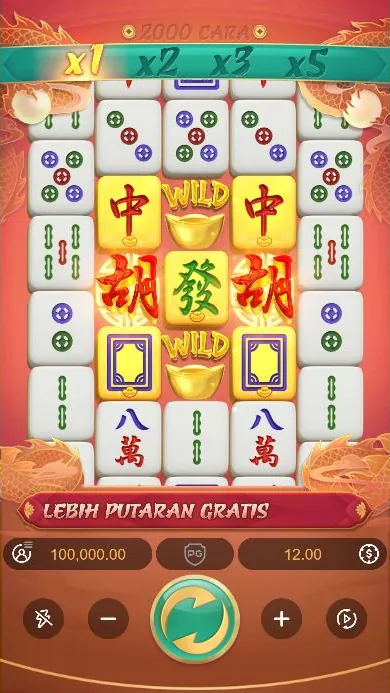
Use a browser rather than searching for an APK. Open a trusted page that provides the game, select the demo if you want to try it without money, and allow the HTML5 game to load. The public PG Soft demo offers several interface languages; this guide uses the English interface. The game is designed for portrait viewing, with an optimal display of 1080x2340 and a 19.5:9 aspect ratio. A different screen may still display it, but the layout can feel less spacious.
For a walkthrough of the game controls and symbols, use the how to play guide. In both games, the controls include Spin, bet controls, sound, paytable, rules and history. Options also include Turbo Spin and Auto Spin with stop conditions. The official game information does not describe a feature-buy option.
How do I add a shortcut on Android with Chrome?
A home-screen shortcut opens the selected website in Chrome; it is not a Mahjong Ways APK and does not install a standalone PG Soft game. Menu labels can vary by Chrome version, but the usual steps are:
- Open Chrome and visit the trusted page where you access the game or demo.
- Open Chrome’s menu and choose Add to Home screen or the equivalent available option.
- Check the page name and confirm that you want to add the shortcut.
- Return to the home screen and open the new shortcut. Confirm that the address belongs to the site you intended to visit.
A shortcut may make a page easier to reopen, but it does not verify the operator, change the game’s rules or make a third-party service official. If the page redirects unexpectedly or asks you to install an unrelated file, stop and check the address instead of continuing.
What Android permissions should I check?
A browser-based game should not require you to install an APK simply to load its HTML5 content. Before granting any permission, ask whether it is necessary for the feature you are using. In particular, be wary of requests for contacts, SMS, call logs, accessibility access, device administration, location or broad file access when there is no clear need.
If you are considering a gaming platform app, check the app’s publisher and the permissions shown by your device before installation. Avoid granting permissions automatically, and do not switch off Android security protections to install a file from an unknown source. You can review or revoke app permissions in your device settings. If you installed a suspicious file or shared sensitive details, stop using it and seek help through India’s National Cyber Crime Reporting Portal or helpline 1930.
03 · App
Can I use Mahjong Ways on an iPhone?
The games support iOS and HTML5, so you can open a page providing the game in Safari rather than looking for an unofficial iPhone installation file. To create a home-screen shortcut, open the page in Safari, tap the Share button, choose Add to Home Screen, check the shortcut name and confirm. The shortcut points to the web page; it is not a separate PG Soft app.
If the game does not load, check that the page has finished opening and that your browser is up to date. Do not install configuration profiles or follow instructions to trust an unknown developer just to access a slot game. When the page asks for account details, remember that the account belongs to the third-party platform, not Mahjong Ways itself.
04 · App
The game’s app performance: what can help?
A browser game’s display and responsiveness can depend on the device, browser and connection. Try these basic checks before assuming that a download is needed:
- Hold the phone in portrait orientation. The game’s stated optimal display is 1080x2340 in a 19.5:9 portrait layout.
- Close unused browser tabs and apps if the page is slow or the device is under load.
- Check that the browser is current, then reload the page if the game has stopped responding.
- Use a stable connection and avoid repeatedly refreshing while a spin or feature is still running.
- If a platform app is being used, check that it is the platform’s genuine app and review its permissions.
Mahjong Ways has 1,024 ways across five reels and four rows. Mahjong Ways 2 has 2,000 ways, with an extra row on reels 2, 3 and 4. Both use cascading wins and multipliers; Mahjong Ways 2 also has a different free-spins feature. These are game rules, not indicators that a device needs a special APK. The public demo can help you check how a title displays without installing an unofficial file.
05 · App
Is real-money Mahjong Ways play allowed in India?
India’s Promotion and Regulation of Online Gaming Act, 2025 applies across India, including to services operated from outside the country. It prohibits offering, advertising and promoting online money games, whether based on chance, skill or a mix, and bars banks and payment systems from processing transactions for them. The Promotion and Regulation of Online Gaming Rules, 2026 came into force on 1 May 2026; an authority determines whether a game is an online money game. Under the stated framework, playing Mahjong Ways for real money is an online money game. This guide does not determine an individual platform’s status or offer legal advice. See the India legal status guide.
The free demo uses virtual credits and involves no money. Real-money play, where a third-party platform offers it, is distinct from trying the demo and is covered by the legal position above. This page is for people aged 18 and over. If gaming is causing distress, contact Tele MANAS on 14416 or 1-800-891-4416; the national mental health helpline is free and available 24x7 in 20 languages. More support information is available from Responsible gaming and the National Mental Health Programme.
FAQ
Questions about Mahjong Ways
Is there an official Mahjong Ways APK?
No standalone Mahjong Ways APK from PG Soft was found. Mahjong Ways and Mahjong Ways 2 are HTML5 games that run in a mobile browser or within a gaming platform app.
How can I download Mahjong Ways on Android?
PG Soft has no official standalone APK for Mahjong Ways. You can open the HTML5 game in a browser or use a gaming platform app, and add a browser shortcut to your home screen if you want quicker access.
Can I play the Mahjong Ways app on an iPhone?
The games support iOS and HTML5, so they can be opened in Safari. You can add the page to your home screen, but the shortcut is not a standalone PG Soft app.
Is the Mahjong Ways demo free to use in India?
The public demo uses virtual credits and involves no money. Real-money play is different and falls under the online money game framework described in India’s Promotion and Regulation of Online Gaming Act, 2025.
Are Mahjong Ways APK hacks or tricks real?
No. Hacks, predictors and patterns do not determine outcomes; spins are random and independent. Unofficial APK files may also expose a device or personal information to malware or data theft.